
Dear Valued Guests,
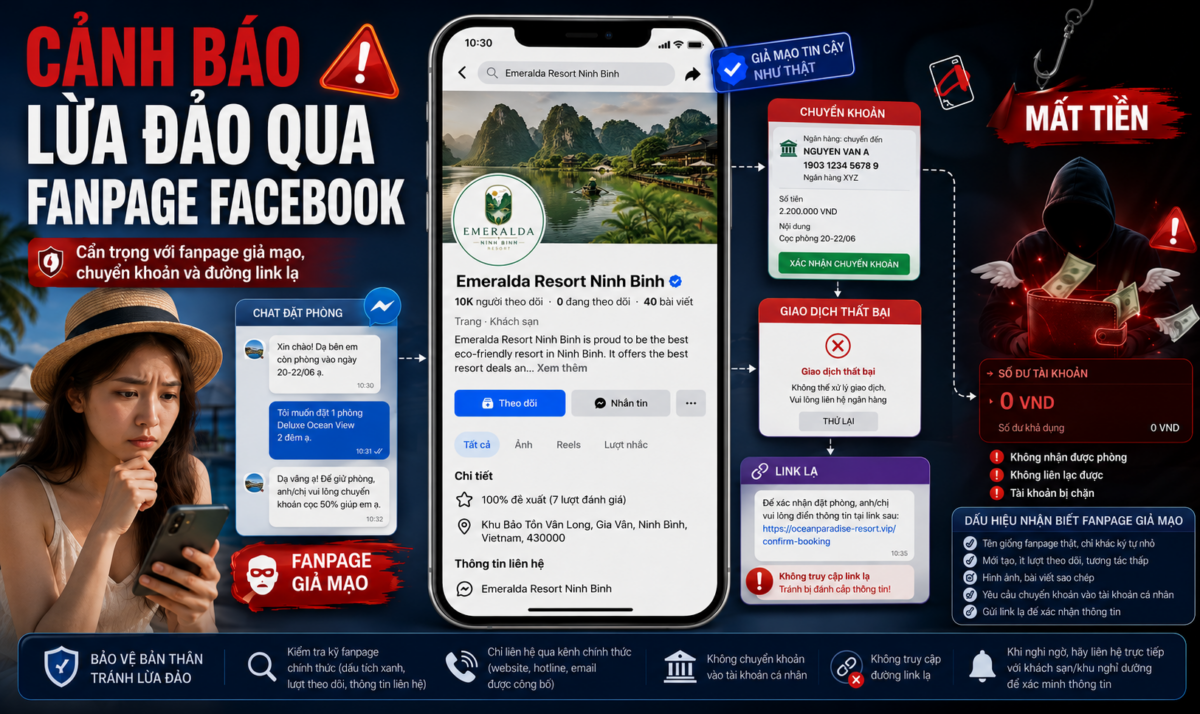
We would like to inform our guests about a growing online scam involving fake Facebook Fanpages. Scammers are creating fake pages that closely imitate official hotel or resort Fanpages, including similar names, photos, posts and page layouts. Some fake pages may even display a blue verification badge, making them appear trustworthy.
Common scam method
Scammers often follow this process:
1. They create a fake Fanpage that looks almost identical to the official hotel or resort page.
2. They post room photos, promotions or reply to booking inquiries as if they were the official reservation team.
3. They ask guests to transfer a deposit or full payment for the room.
4. After receiving the payment, they claim the transaction was unsuccessful or not recorded by the system.
5. They then send a suspicious link and ask guests to click it to confirm the booking, verify the payment or receive a refund.
6. Once guests access the link and enter personal or banking information, scammers may steal sensitive data and withdraw money from the guest’s bank account.
Please do not click on suspicious links, and never share your OTP, banking password, card details or login information with anyone.
How to identify a real Fanpage and a fake Fanpage
Before making a reservation or payment, please check the Fanpage carefully by following these steps:
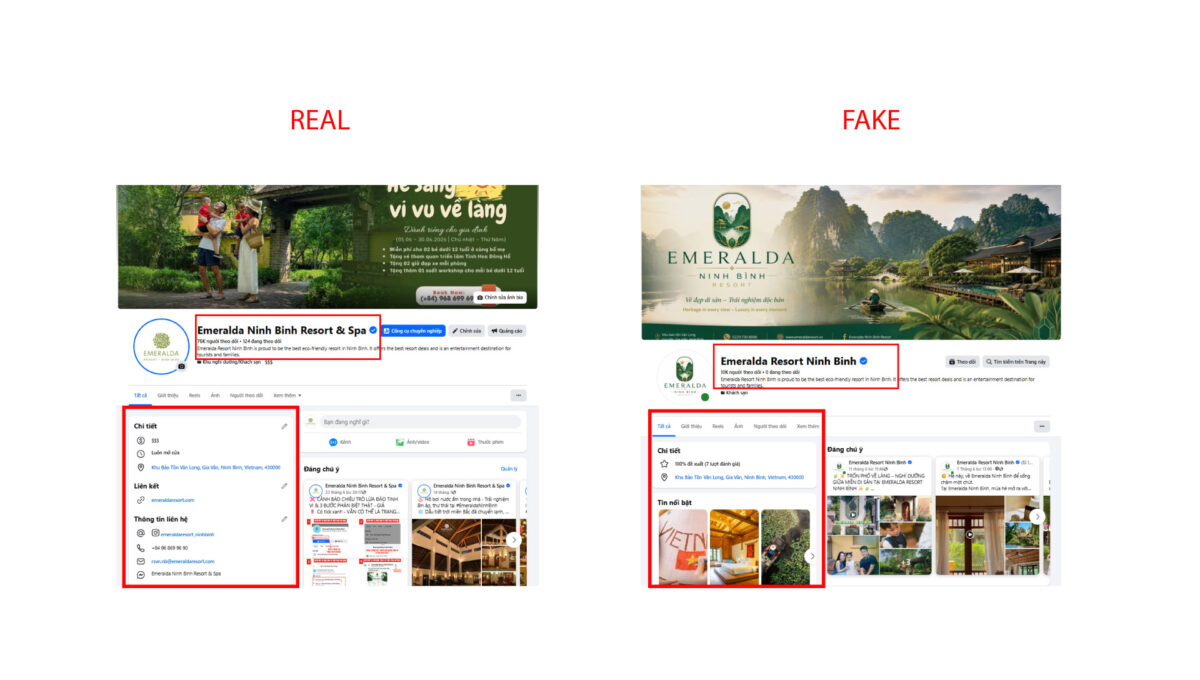
Step 1: Check the Fanpage name
Look closely at the Fanpage name. Fake pages often use names that are almost identical to the official page, with only small differences in spelling, punctuation, spacing or added words such as “booking”, “reservation”, “official” or “support”.
Step 2: Check the Fanpage URL
Go to the Fanpage information section and check the page URL. An official page usually has a clear and consistent URL related to the brand name. Be cautious if the URL contains strange characters, unrelated words or appears recently changed.
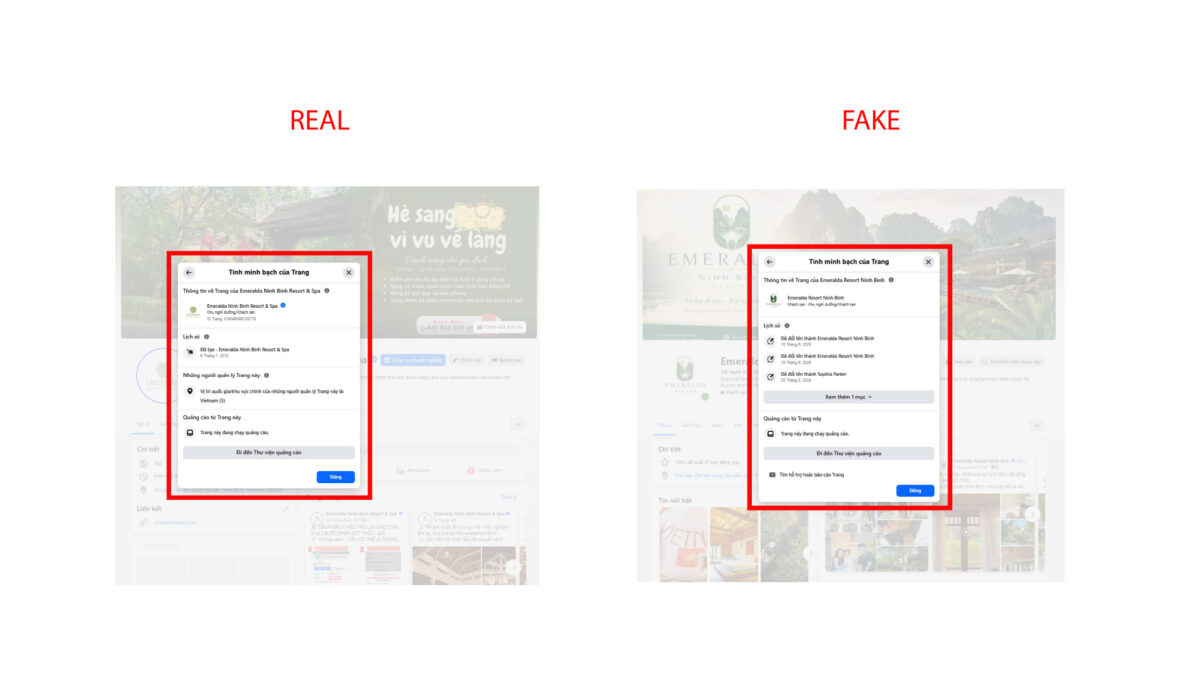
Step 3: Check the “About” section
Open the **About** section of the Fanpage and verify the following information:
* Official website
* Hotline or phone number
* Contact email
* Hotel or resort address
* Page creation date
* Fanpage name change history
If the information does not match the official website or seems suspicious, please do not proceed with the transaction.
Step 4: Check the transparency of the page
Fake Fanpages are often recently created, and their page names may be changed frequently. In addition, the Fanpage administrators may not be based in Vietnam.
Step 5: Check the receiving bank account
Guests should only transfer payment to the official bank account announced by the hotel or resort. Please be especially cautious if you are asked to transfer money to a personal bank account or an account name unrelated to the business.
Step 6: Do not click suspicious links
If a Fanpage sends you a link to confirm your booking, verify payment, request a refund or enter banking information, please do not access it. This may be a phishing link created to steal your information.
Step 7: Verify directly before payment
Before making any reservation or payment, please contact the hotel or resort directly through official channels such as the official website, hotline or published email address.
Important safety reminders
To protect your personal information and assets, please remember:
* Only book through official websites, hotlines, emails or verified official Fanpages.
* Do not transfer money to unknown personal bank accounts.
* Do not share OTPs, banking passwords or card information.
* Do not click suspicious links sent via messages.
* If you suspect a fake Fanpage, stop the transaction immediately and contact the hotel or resort directly for verification.
We kindly remind all guests to stay alert and protect themselves from online booking scams.
Sincerely.